Bands explained
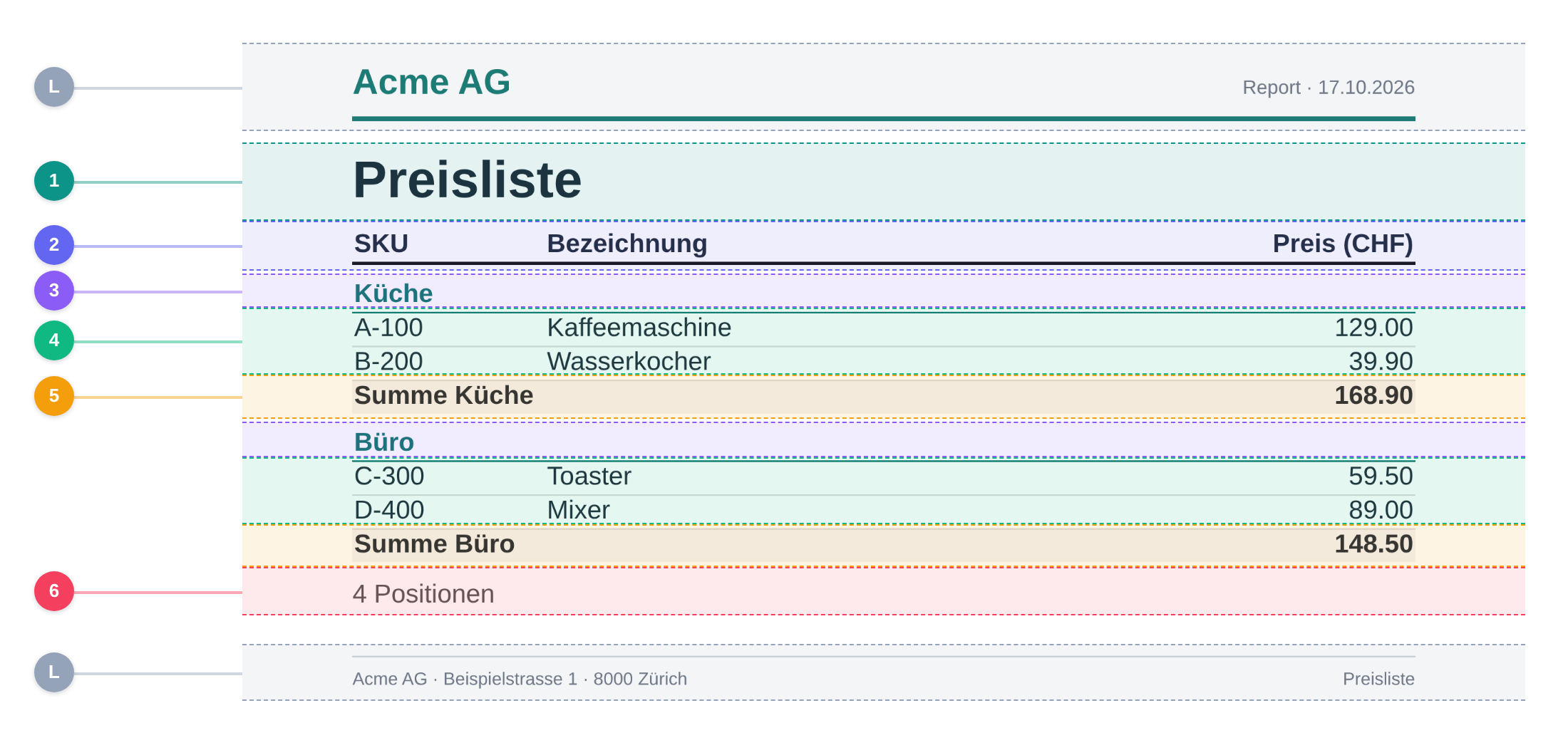
Every report is a stack of full-width bands. Using the price list, you can see which band renders what — and how often.
The price list, band by band
The price list defines a report start band with the title, a grid header, a detail band, a group with a header and footer, and a report end band with the summary. The rendered page is the result of those bands running in order.
Legend
-
L
Layout chrome (L)
Letterhead and address line come from CompanyLayout. A layout wraps every report that uses it, but it is not a band.
-
1
Report start / title (1)
Runs exactly once at the beginning of the report. This is where the report title belongs. It does not repeat on page 2, 3, and so on.
-
2
Grid header (2)
Introduces the detail rows. Here it opens the table and renders the column headings; in strict mode it is repeated at the top of every page.
-
3
Group header (3)
Runs once whenever the group key changes. The price list groups by category, so “Küche” and “Büro” each get a header.
-
4
Detail band (4)
Runs once per record. Each price-list row is one detail run; the band always renders the same Blade view.
-
5
Group footer (5)
Runs when a group ends and can read its aggregates. Here it prints the subtotal for the category.
-
6
Report end / summary (6)
Runs exactly once after the last record and has access to the report aggregates. Here it closes the table and prints the position count. It is not repeated on later pages.
The band stack
From the outside in, the engine assembles a report in this order. Undefined bands are skipped.
pageHeader()
reportStart()
gridHeader()
group()->header()
detail()
group()->footer()
reportEnd()
pageFooter()
Report bands run once — page bands repeat
reportStart() and reportEnd() wrap the whole report. They run exactly once, no matter how many pages the report spans. Only pageHeader(), gridHeader() and pageFooter() are repeated when a new page starts in strict mode.
Bands across page breaks
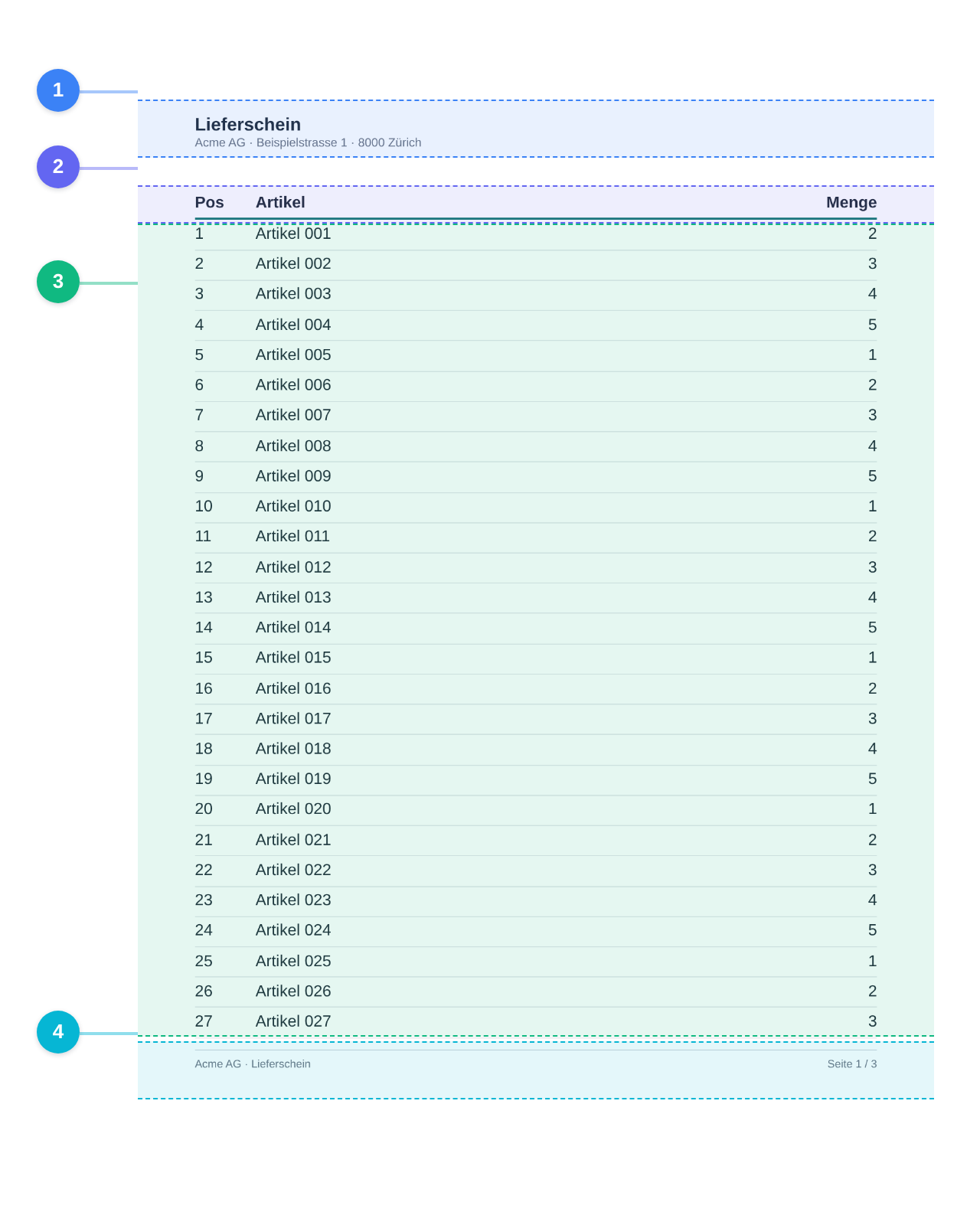
The packing list makes the repetition visible. It uses strict mode, where every band has a fixed height. Page header, grid header and page footer repeat on every page, while the detail band continues with the next records.
From definition to Blade
The report class decides which bands exist and which view renders each one. The Blade views only render their fragment; the engine decides how often the fragment runs.
<?php

declare(strict_types=1);

namespace App\Reports\PriceList;

use App\Reports\Layout\CompanyLayout;
use Guggach\Reports\Definition\ReportBuilder;
use Guggach\Reports\Filters\FilterBuilder;
use Guggach\Reports\Report as BaseReport;
use Guggach\Reports\Sources\ReportSource;

final class Report extends BaseReport
{
    public function key(): string
    {
        return 'price_list';
    }

    public function name(): string
    {
        return 'Preisliste';
    }

    public function layout(): string
    {
        return CompanyLayout::class;
    }

    public function source(): ReportSource
    {
        return new Source;
    }

    /**
     * Demonstrate the fluent control description: operator listbox for the
     * number, multiselect for the enum and a searchable dual-list for the
     * relation (id/FK) field.
     */
    public function filterControls(): array
    {
        return FilterBuilder::for($this->source())
            ->field('price')->operators(['=', '>=', '<=', 'between', 'in'])
            ->field('category')->multiselect()
            ->field('supplier')->picker(valueField: 'id', labelField: 'label')
            ->build();
    }

    public function define(ReportBuilder $r): void
    {
        // Module-relative view names resolve to app/Reports/PriceList/views/*.
        // Report start/end run once per report; the grid header introduces the
        // table and the detail band renders one row per record.
        $r->reportStart(view: 'report-start');
        $r->gridHeader(view: 'grid-head');
        $r->detail(view: 'row');
        $r->reportEnd(view: 'report-end');

        // Grouped by category (data is sorted by category) with a subtotal.
        $r->group('category', function ($g): void {
            $g->header(view: 'category-head');
            $g->footer(view: 'category-foot');
            $g->aggSum('price', as: 'category_total');
        });
    }
}
<h1 style="margin:0 0 12px">{{ $ctx->report->name() }}</h1>
<table style="width:100%; border-collapse:collapse">
    <thead>
        <tr style="border-bottom:2px solid #111">
            <th style="text-align:left">SKU</th>
            <th style="text-align:left">Bezeichnung</th>
            <th style="text-align:right">Preis (CHF)</th>
        </tr>
    </thead>
    <tbody>
<tr style="border-bottom:1px solid #ddd">
    <td>{{ $ctx->sku }}</td>
    <td>{{ $ctx->name }}</td>
    <td style="text-align:right">{{ number_format((float) $ctx->price, 2, '.', "'") }}</td>
</tr>
    </tbody>
</table>

<p style="margin-top:12px; color:#555">{{ $ctx->total }} Positionen</p>
Read from the running module, so the code matches the preview.